
Чи задавалися ви коли-небудь питанням: "Який розмір стандартного паперу для принтерів?" Це поширене питання для всіх, хто працює з документами, будь то на роботі, в школі або вдома. Правда в тому, що немає універсальної відповіді, оскільки стандартний розмір паперу варіюється залежно від регіонів, галузей промисловості та конкретних потреб.
Вибір правильного розміру паперу важливий. Це економить час, уникає помилок форматування та гарантує, що ваші документи виглядають поліровано та професійно. У цій статті ми надамо вам швидкий огляд ключових моментів, включаючи:
- ●Який стандартний розмір для паперу для принтера
- ●Як друкувати паперові документи стандартного розміру
- ●Які інші популярні розміри паперу, щоб знати
- ●FAQ про розміри паперу для принтерів

Звичайний / стандартний розмір паперу для принтера (Швидка відповідь)
У Північній Америці «звичайний» папір для принтерів є US Letter: 8,5 × 11 дюймів (216 × 279 мм). Міжнародним стандартом є A4: 210 × 297 мм (8,27 × 11,69 дюйма).
| Ім'я | Дюйми (Ш × В) | Міліметри | Типове використання |
|---|---|---|---|
| США Лист | 8,5 × 11 дюймів | 216 × 279 мм | Офісні документи США/Канади |
| А4 (ISO 216) | 8,27 × 11,69 дюйма | 210 × 297 мм | Міжнародні офісні документи |
- ●Чи є 8,5 на 11 нормальним папером? Так, в США / Канаді.
- ●Для міжнародного друку виберіть A4, щоб уникнути проблем з форматуванням.
Розмір A4 (ISO 216): 210 × 297 мм
А4 = 210 × 297 мм = 8,27 × 11,69 дюймів = 21,0 × 29,7 см.
Співвідношення аспектів: 1:√2.
Загальні пікселі: 595×842 (72 DPI), 1240×1754 (150 DPI), 2480×3508 (300 DPI).
| Unit | Розміри | Примітки |
|---|---|---|
| Міліметри | 210 × 297 мм | Серія ISO 216 A |
| Дюйми | 8,27 × 11,69 дюйма | ≈ співвідношення 1:√2 |
| Пікселі | 2480 × 3508 пікселів | при 300 DPI (друк) |
Чи потрібно швидко встановити A4? Перейти до: Слово / Google Docs / Фотошоп
Розмір листа США: 8,5 × 11 дюймів
US Letter розміри 8,5 × 11 дюймів (216 × 279 мм), що робить його приблизно на 6 мм ширшим і на 18 мм коротшим, ніж A4.
Це «стандартний» розмір офісного паперу за замовчуванням в США та Канаді, тому більшість офісних принтерів та шаблонів документів в Північній Америці розроблені навколо US Letter за замовчуванням.
Tip: Якщо ваш додаток за замовчуванням має розмір A4, перемикніть розмір паперу на US Letter перед друком, щоб уникнути обрізки.
A4 проти порівняння листа США
| Item | A4 | США Лист |
|---|---|---|
| Розміри | 210 × 297 мм (8,27 × 11,69 дюйма) | 216 × 279 мм (8,5 × 11 дюймів) |
| Регіон | Європа/Азія та більшість країн | США та Канада |
| Коли вибрати | Міжнародні документи, шаблони ISO | Внутрішній друк США / Канади |
| Рада сумісності | Встановити A4 у програмі та драйвері | Встановити US Letter у програмі та драйвері |
Пікселі & DPI Cheat Sheet
| Size | 72 д/ п | 150 т/ п | 300 dpi (друкувати) | Рекомендовані маржі |
|---|---|---|---|---|
| A4 | 595 × 842 | 1240 × 1754 | 2480 × 3508 | 25 мм (1 дюйм) з усіх боків |
| США Лист | 612 × 792 | 1275 × 1650 | 2550 × 3300 | 25 мм (1 дюйм) з усіх боків |
Експортуйте при 300 DPI для чіткого друку та відповідайте розміру паперу драйвера принтера, щоб уникнути масштабування.
Як друкувати паперові документи стандартного розміру
На перший погляд розміри паперу Letter і A4 здаються взаємодіючими. Але їх тонкі відмінності - додаткова висота A4 і додаткова ширина Letter - можуть викликати проблеми з форматуванням при друку документів, призначених для одного розміру на інший.
Друк листових документів США на папері A4
Щоб уникнути обрізки, встановіть принтер на "зменшити, щоб підійти" або налаштуйте збільшення на 97%. Це гарантує, що весь документ вписується в вузьку ширину A4 без відрізання вмісту.
Друк документів A4 на листовому папері
Оскільки A4 приблизно на 6% вище, ніж Letter, ви можете запобігти обрізанню верхньої і нижньої частин, встановивши збільшення на 94%. Як альтернатива, багато принтерів пропонують опцію "підходить до сторінки", яка може автоматично налаштувати масштабування для безперервного друку.
Налаштування A4 в Microsoft Word
- File → Налаштування сторінки / Макет → Розмір паперу
- Виберіть A4 (210 × 297 мм)
- Маржі: 25 мм (1 дюйм) з усіх боків
- Перед друком: Друк → Розмір паперу: A4
- Якщо за замовчуванням принтер має значення Letter, увімкніть Fit/Scale to A4
Встановити A4 в Google Docs
- File → Налаштування сторінки → Розмір паперу: A4
- Маржі: 1 дюйм (25,4 мм)
- Роздрукувати → Більше налаштувань → Розмір паперу: A4 → Підходити до сторінки
Експорт A4 в Photoshop/Illustrator
- Новий файл: 2480 × 3508 px, 300 DPI
- Колір: CMYK для друку або sRGB для цифрового
- Експорт PDF/PNG; друкувати в масштабі 100% і вибрати A4 в драйвері
З розвитком технології мобільного друку, Портативні принтери A4 Вони стають все більш популярними.
HPRT MT800 перевизначає бездротовий друк своїм елегантним дизайном, передовими функціоналами та безперервною сумісністю з широким спектром пристроїв.
Підтримуючи папір розміру A4 та US Letter, цей портативний принтер без чорнила дозволяє друкувати PDF-файли, документи Word, зображення та веб-сторінки безпосередньо з телефону. Ідеально підходить для ділових мандрівників, віддалених працівників та студентів, HPRT MT800 забезпечує надійний, високоякісний друк в будь-якому місці - в офісі, в дорозі або на місці.
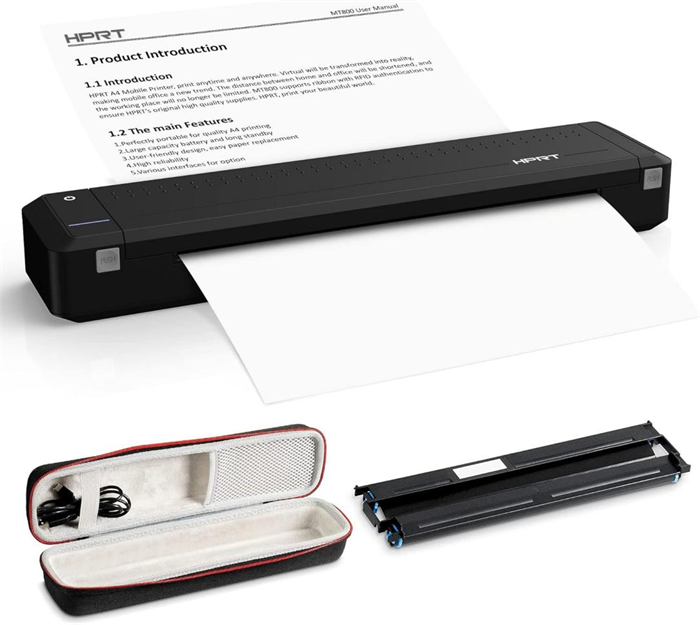
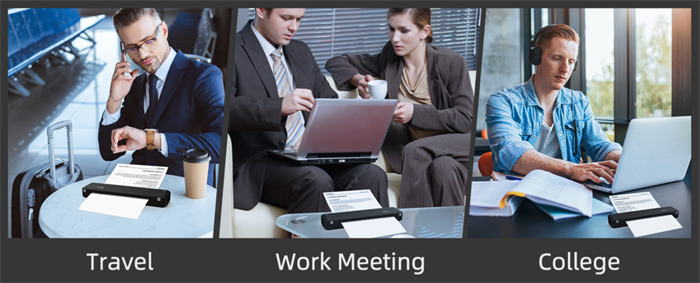
- ✓ Портативний дизайн: Легкий і легкий в перенесенні.
- ✓ 300 DPI Термічна передача: гострі, стійкі до зникнення друки для контрактів.
- ✓ Широка сумісність: iOS, Android, Mac, Windows, iPad через Bluetooth / USB.
- ✓ Вбудована батарея: 26 годин очікування для подорожі / полевої роботи.
HPRT надає різні портативні термічні принтери та принтери документів A4, ідеально підходить для домашнього та офісного використання. Як надійний прямий виробник з Китаю, ми гарантуємо виняткову якість, надійність та продуктивність кожного продукту.

MT800Q безчорнильний міні-принтер A4
Елегантний невеликий портативний принтер A4 з батареєю, ідеально підходить для дому, офісу та подорожей.
- • Термічний трансферний друк
- • Легкий і компактний в 735,5 г
- • USB типу C, Bluetooth 4.0
- • Швидкість друку до 15 мм/с
- • Сумісні з Windows, iOS, Android, MAC
- • друк високої роздільної здатності 300 dpi
- Дізнайтеся більше

MT810 Малий мобільний принтер
Швидкий термічний принтер A4 для друку, підтримує дві різні ширини з змінною довжиною, пропонуючи гнучкість для різних завдань мобільного друку.
- • Прямий термічний друк
- • Легкий і компактний в 921 г
- • USB типу C, Bluetooth 5.0 (з'єднання Bluetooth для багатьох користувачів)
- • Швидкість друку до 30 мм/с
- • Сумісні з Windows, iOS, Android, MAC
- • роздільна здатність друку 203dpi
- • Підтримує паперові рулони шириною 4 "(110 мм) & 8 "(210 мм)
- Дізнайтеся більше
Шукаєте замовлення або друк на замовлення?
Які інші популярні розміри паперу, щоб знати
Загальні розміри паперу США
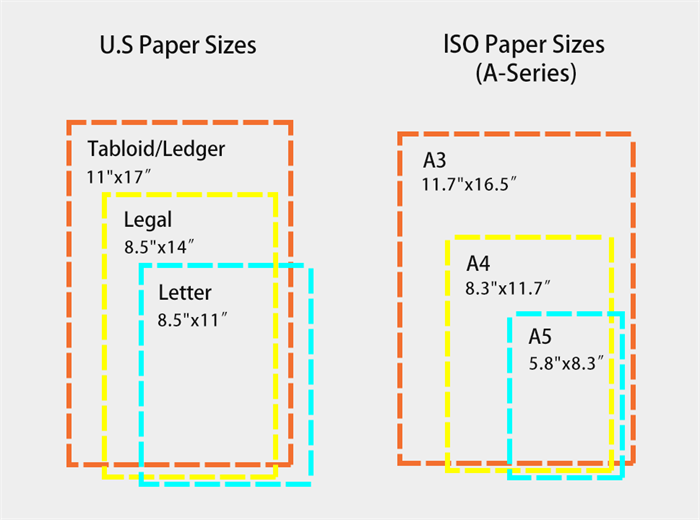
●Юридичний папір (8,5 × 14 дюймів) — довше, ніж буква; використовується для договорів/юридичних документів.
●Таблоїд / Ledger (11 × 17 дюймів) — Плакати, інформаційні бюлетені, великі дизайни.
Загальні міжнародні розміри ISO
Стандарт ISO 216 є всесвітньо визнаною системою для розмірів паперу, що має постійне співвідношення аспектів один до квадратного кореня двох. Це співвідношення гарантує, що листи зберігають пропорційні макети при складанні або масштабуванні. Широко використовується в Європі, Азії та за її межами, вона забезпечує єдину основу для друку, копіювання та видавництва.
У рамках системи ISO серія А є найбільш поширеною, призначеною для повсякденних завдань, таких як друк, письмо та офісне використання.
На діаграмі праворуч порівнюється розмір паперу США з міжнародними розмірами ISO.
| Розмір паперу | Розміри (мм) | Загальні застосування |
|---|---|---|
| A0 | 841 × 1189 | Великі плакати, інженерні малюнки, плани |
| A1 | 594 × 841 | Технічні малюнки, конференц-плакати, дисплейні дошки |
| A2 | 420 × 594 | Плакати, графіки, графічний дизайн |
| A3 | 297 × 420 | Презентації, схеми, проектні проекти |
| A4 | 210 × 297 | Листи, друковані документи, офісні папери |
| A5 | 148 × 210 | Ноутбуки, брошури, флаери |
| A6 | 105 × 148 | Поштові листівки, листівки, невеликі листівки |
Часті питання про розміри паперу для принтера
1. У чому різниця між A4 і US Letter?
A4 є трохи вужчим і довшим, ніж US Letter, що робить його глобальним стандартом за межами Північної Америки. Американський лист більш поширений в США та Канаді, але може викликати проблеми з форматуванням при друку на міжнародному рівні.
2. Чи можу я використовувати папір A4 на американському принтері?
Так, більшість принтерів можуть обробляти папір A4. Просто переконайтеся, що налаштуєте розмір паперу в налаштуваннях принтера, щоб уникнути неправильного вирівнювання.
3. Який розмір паперу я повинен використовувати для міжнародного друку?
A4 є найбезпечнішим вибором для міжнародного друку, оскільки він визнаний і прийнятий у всьому світі.
4. Які розміри пікселів для A4 / Letter при 300 DPI?
А4: 2480 × 3508 пікселів; Американський лист: 2550 × 3300 px.
5. Які маржі рекомендуються для A4/Letter?
Зазвичай за замовчуванням: 25 мм (1 дюйм) з усіх боків.
Розуміння стандартних розмірів паперу принтера допомагає вам безперервно друкувати документи, будь то вдома, в офісі або в дорозі. Для більшості людей папір A4 є ідеальним універсальним варіантом, завдяки його глобальній сумісності та практичним розмірам.
І якщо ви шукаєте найкраще зручність, портативний принтер A4 може революціонувати ваш спосіб роботи. Компактний і простий у використанні, він гарантує, що ви ніколи не будете без надійного рішення для друку, незалежно від того, де ви знаходитесь.